{"_id":"@magenta/sketch","_rev":"2997031","name":"@magenta/sketch","description":"Make sketches in the browser with machine learning.","dist-tags":{"latest":"0.2.0"},"maintainers":[{"name":"adarob","email":""},{"name":"cghawthorne","email":""},{"name":"hardmaru","email":""},{"name":"iansimon","email":""},{"name":"notwaldorf","email":""},{"name":"vdumoulin","email":""}],"time":{"modified":"2023-08-29T08:34:52.000Z","created":"2018-08-02T23:56:50.689Z","0.2.0":"2019-05-14T17:55:31.274Z","0.1.4":"2019-01-03T21:03:31.912Z","0.1.3":"2018-12-17T18:08:58.303Z","0.1.2":"2018-08-07T01:38:03.556Z","0.1.1":"2018-08-03T00:10:38.013Z","0.1.0":"2018-08-02T23:56:50.689Z"},"users":{},"author":{"name":"Magenta"},"repository":{"type":"git","url":"https://github.com/tensorflow/magenta-js.git"},"versions":{"0.2.0":{"name":"@magenta/sketch","version":"0.2.0","description":"Make sketches in the browser with machine learning.","main":"es5/index.js","types":"es5/index.d.ts","jsdelivr":"dist/magentasketch.js","unpkg":"dist/magentasketch.js","dependencies":{"@tensorflow/tfjs":"^1.0.2"},"devDependencies":{"@types/clone":"^0.1.30","@types/file-saver":"^1.3.0","@types/ndarray":"^1.0.6","@types/tape":"^4.2.32","browserify":"^14.4.0","clang-format":"^1.2.3","clone":"^1.0.4","file-saver":"^1.3.8","file-saver-typescript":"^1.0.1","http-server":"^0.11.1","in-publish":"^2.0.0","minimist":"^1.2.0","@types/node":"^12.0.1","fs":"0.0.1-security","path":"^0.12.7","tape":"^4.9.0","ts-loader":"^5.3.0","ts-node":"^5.0.1","tsify":"^3.0.4","tslint":"^5.9.1","typedoc":"^0.14.2","typedoc-plugin-sourcefile-url":"^1.0.3","typescript":"^3.3.3333","webpack":"^4.24.0","webpack-cli":"^3.1.2","webpack-dev-server":"^3.1.14"},"scripts":{"prepublish":"yarn lint && yarn build && yarn bundle","build":"tsc","bundle":"webpack --config ./webpack/lib.config.ts","lint":"tslint -c ../tslint.json -p . -t verbose","test":"ts-node node_modules/tape/bin/tape src/**/*_test.ts","build-demos":"webpack --config ./webpack/demo.config.ts","run-demos":"yarn build-demos && http-server demos/","serve-demos":"http-server demos/","serve-dist":"http-server dist/","publish-demos":"yarn build-demos && mkdir -p ../docs/sketch/demos && cp demos/*.{js,html,css} ../docs/sketch/demos","generate-docs":"typedoc --sourcefile-url-prefix 'https://github.com/tensorflow/magenta-js/tree/master/sketch/src/' --out ../docs/sketch src --mode modules --excludePrivate --exclude '**/*+(index|test).ts' --excludeExternals","docs":"sh ./scripts/generate-docs.sh && yarn publish-demos"},"author":{"name":"Magenta"},"license":"Apache-2.0","repository":{"type":"git","url":"https://github.com/tensorflow/magenta-js.git"},"_id":"@magenta/sketch@0.2.0","dist":{"shasum":"f6767e2ab4ff72a67f790c8a615411a7ed5118d4","size":314854,"noattachment":false,"key":"/@magenta/sketch/-/@magenta/sketch-0.2.0.tgz","tarball":"http://registry.cnpm.dingdandao.com/@magenta/sketch/download/@magenta/sketch-0.2.0.tgz"},"maintainers":[{"name":"adarob","email":""},{"name":"cghawthorne","email":""},{"name":"hardmaru","email":""},{"name":"iansimon","email":""},{"name":"notwaldorf","email":""},{"name":"vdumoulin","email":""}],"_npmUser":{"name":"notwaldorf","email":"notwaldorf@gmail.com"},"directories":{},"_npmOperationalInternal":{"host":"s3://npm-registry-packages","tmp":"tmp/sketch_0.2.0_1557856531049_0.25588814753352485"},"_hasShrinkwrap":false,"_cnpmcore_publish_time":"2021-12-24T01:47:14.125Z","publish_time":1557856531274,"_cnpm_publish_time":1557856531274},"0.1.4":{"name":"@magenta/sketch","version":"0.1.4","description":"Make sketches in the browser with machine learning.","main":"es5/index.js","types":"es5/index.d.ts","jsdelivr":"dist/magentasketch.js","unpkg":"dist/magentasketch.js","dependencies":{"@tensorflow/tfjs":"^0.13.3"},"devDependencies":{"@types/clone":"^0.1.30","@types/tape":"^4.2.32","browserify":"^14.4.0","clang-format":"^1.2.3","clone":"^1.0.4","fs":"^0.0.1-security","http-server":"^0.11.1","tape":"^4.9.0","ts-node":"^5.0.1","tsify":"^3.0.4","tslint":"^5.9.1","typedoc":"^0.11.1","typedoc-plugin-sourcefile-url":"^1.0.3","typescript":"^2.7.2"},"scripts":{"prepublish":"yarn lint && yarn build && yarn bundle","build":"tsc","bundle":"browserify --standalone ms src/index.ts -p [tsify] > dist/magentasketch.js","lint":"tslint -c ../tslint.json -p . -t verbose","build-demos":"yarn build && yarn bundle && cp dist/*.js demos","run-demos":" yarn build-demos && http-server demos/","publish-demos":"yarn build-demos && mkdir -p ../docs/sketch/demos && cp demos/*.{js,html,css} ../docs/sketch/demos","generate-docs":"typedoc --sourcefile-url-prefix 'https://github.com/tensorflow/magenta-js/tree/master/sketch/src/' --out ../docs/sketch src --mode modules --excludePrivate --exclude '**/*+(index|test).ts' --excludeExternals","doc":"yarn generate-docs && yarn publish-demos"},"author":{"name":"Magenta"},"license":"Apache-2.0","repository":{"type":"git","url":"https://github.com/tensorflow/magenta-js.git"},"_id":"@magenta/sketch@0.1.4","dist":{"shasum":"adb45225f0e91f1f36ddb436d49324127da0a51e","size":319820,"noattachment":false,"key":"/@magenta/sketch/-/@magenta/sketch-0.1.4.tgz","tarball":"http://registry.cnpm.dingdandao.com/@magenta/sketch/download/@magenta/sketch-0.1.4.tgz"},"maintainers":[{"name":"adarob","email":""},{"name":"cghawthorne","email":""},{"name":"hardmaru","email":""},{"name":"iansimon","email":""},{"name":"notwaldorf","email":""},{"name":"vdumoulin","email":""}],"_npmUser":{"name":"notwaldorf","email":"notwaldorf@gmail.com"},"directories":{},"_npmOperationalInternal":{"host":"s3://npm-registry-packages","tmp":"tmp/sketch_0.1.4_1546549411711_0.5307691447622276"},"_hasShrinkwrap":false,"_cnpmcore_publish_time":"2021-12-24T01:47:12.978Z","publish_time":1546549411912,"_cnpm_publish_time":1546549411912},"0.1.3":{"name":"@magenta/sketch","version":"0.1.3","description":"Make sketches in the browser with machine learning.","main":"es5/index.js","types":"es5/index.d.ts","jsdelivr":"dist/magentasketch.js","unpkg":"dist/magentasketch.js","dependencies":{"@tensorflow/tfjs":"^0.13.3"},"devDependencies":{"@types/clone":"^0.1.30","@types/tape":"^4.2.32","browserify":"^14.4.0","clang-format":"^1.2.3","clone":"^1.0.4","fs":"^0.0.1-security","http-server":"^0.11.1","tape":"^4.9.0","ts-node":"^5.0.1","tsify":"^3.0.4","tslint":"^5.9.1","typedoc":"^0.11.1","typedoc-plugin-sourcefile-url":"^1.0.3","typescript":"^2.7.2"},"scripts":{"prepublish":"yarn lint && yarn build && yarn bundle","build":"tsc","bundle":"browserify --standalone ms src/index.ts -p [tsify] > dist/magentasketch.js","lint":"tslint -c ../tslint.json -p . -t verbose","run-demos":"yarn build && yarn bundle && cp dist/*.js demos && http-server demos/","doc":"typedoc --sourcefile-url-prefix 'https://github.com/tensorflow/magenta-js/tree/master/sketch/src/' --out ../docs/sketch src --mode modules --excludePrivate --exclude '**/*+(index|test).ts' --excludeExternals"},"author":{"name":"Magenta"},"license":"Apache-2.0","repository":{"type":"git","url":"https://github.com/tensorflow/magenta-js.git"},"_id":"@magenta/sketch@0.1.3","dist":{"shasum":"9ac1ea43cb84ebac53e561a03c0c599724cab99a","size":319765,"noattachment":false,"key":"/@magenta/sketch/-/@magenta/sketch-0.1.3.tgz","tarball":"http://registry.cnpm.dingdandao.com/@magenta/sketch/download/@magenta/sketch-0.1.3.tgz"},"maintainers":[{"name":"adarob","email":""},{"name":"cghawthorne","email":""},{"name":"hardmaru","email":""},{"name":"iansimon","email":""},{"name":"notwaldorf","email":""},{"name":"vdumoulin","email":""}],"_npmUser":{"name":"notwaldorf","email":"notwaldorf@gmail.com"},"directories":{},"_npmOperationalInternal":{"host":"s3://npm-registry-packages","tmp":"tmp/sketch_0.1.3_1545070138111_0.25059500771373244"},"_hasShrinkwrap":false,"_cnpmcore_publish_time":"2021-12-24T01:47:10.323Z","publish_time":1545070138303,"_cnpm_publish_time":1545070138303},"0.1.2":{"name":"@magenta/sketch","version":"0.1.2","description":"Make sketches in the browser with machine learning.","main":"es5/index.js","types":"es5/index.d.ts","jsdelivr":"dist/magentasketch.js","unpkg":"dist/magentasketch.js","dependencies":{"@tensorflow/tfjs":"^0.12.4"},"devDependencies":{"@types/clone":"^0.1.30","@types/tape":"^4.2.32","browserify":"^14.4.0","clang-format":"^1.2.3","clone":"^1.0.4","fs":"^0.0.1-security","http-server":"^0.11.1","tape":"^4.9.0","ts-node":"^5.0.1","tsify":"^3.0.4","tslint":"^5.9.1","typedoc":"^0.11.1","typedoc-plugin-sourcefile-url":"^1.0.3","typescript":"^2.7.2"},"scripts":{"prepublish":"yarn lint && yarn build && yarn bundle","build":"tsc","bundle":"browserify --standalone ms src/index.ts -p [tsify] > dist/magentasketch.js","lint":"tslint -c ../tslint.json -p . -t verbose","run-demos":"yarn build && yarn bundle && cp dist/*.js demos && http-server demos/","doc":"typedoc --sourcefile-url-prefix 'https://github.com/tensorflow/magenta-js/tree/master/sketch/src/' --out ../docs/sketch src --mode modules --excludePrivate --exclude '**/*+(index|test).ts' --excludeExternals"},"author":{"name":"Magenta"},"license":"Apache-2.0","repository":{"type":"git","url":"https://github.com/tensorflow/magenta-js.git"},"_id":"@magenta/sketch@0.1.2","dist":{"shasum":"47e93298dff8a5fa43836f35d88849b0f1e86381","size":292145,"noattachment":false,"key":"/@magenta/sketch/-/@magenta/sketch-0.1.2.tgz","tarball":"http://registry.cnpm.dingdandao.com/@magenta/sketch/download/@magenta/sketch-0.1.2.tgz"},"maintainers":[{"name":"adarob","email":""},{"name":"cghawthorne","email":""},{"name":"hardmaru","email":""},{"name":"iansimon","email":""},{"name":"notwaldorf","email":""},{"name":"vdumoulin","email":""}],"_npmUser":{"name":"hardmaru","email":"hardmaru@gmail.com"},"directories":{},"_npmOperationalInternal":{"host":"s3://npm-registry-packages","tmp":"tmp/sketch_0.1.2_1533605883408_0.025613395584226373"},"_hasShrinkwrap":false,"_cnpmcore_publish_time":"2021-12-24T01:47:07.573Z","publish_time":1533605883556,"_cnpm_publish_time":1533605883556},"0.1.1":{"name":"@magenta/sketch","version":"0.1.1","description":"Make sketches in the browser with machine learning.","main":"es5/index.js","types":"es5/index.d.ts","jsdelivr":"dist/magentasketch.js","unpkg":"dist/magentasketch.js","dependencies":{"@tensorflow/tfjs-core":"^0.12.0"},"devDependencies":{"@types/clone":"^0.1.30","@types/tape":"^4.2.32","browserify":"^14.4.0","clang-format":"^1.2.3","clone":"^1.0.4","fs":"^0.0.1-security","http-server":"^0.11.1","tape":"^4.9.0","ts-node":"^5.0.1","tsify":"^3.0.4","tslint":"^5.9.1","typedoc":"^0.11.1","typedoc-plugin-sourcefile-url":"^1.0.3","typescript":"^2.7.2"},"scripts":{"prepublish":"yarn lint && yarn build && yarn bundle","build":"tsc","bundle":"browserify --standalone ms src/index.ts -p [tsify] > dist/magentasketch.js","lint":"tslint -c ../tslint.json -p . -t verbose","run-demos":"yarn http-server","doc":"typedoc --sourcefile-url-prefix 'https://github.com/tensorflow/magenta-js/tree/master/sketch/src/' --out ../docs/sketch src --mode modules --excludePrivate --exclude '**/*+(index|test).ts' --excludeExternals"},"author":{"name":"Magenta"},"license":"Apache-2.0","repository":{"type":"git","url":"https://github.com/tensorflow/magenta-js.git"},"_id":"@magenta/sketch@0.1.1","dist":{"shasum":"2fa12fcc7f76b1088a93647890e00b55cab3bf15","size":159958,"noattachment":false,"key":"/@magenta/sketch/-/@magenta/sketch-0.1.1.tgz","tarball":"http://registry.cnpm.dingdandao.com/@magenta/sketch/download/@magenta/sketch-0.1.1.tgz"},"maintainers":[{"name":"adarob","email":""},{"name":"cghawthorne","email":""},{"name":"hardmaru","email":""},{"name":"iansimon","email":""},{"name":"notwaldorf","email":""},{"name":"vdumoulin","email":""}],"_npmUser":{"name":"hardmaru","email":"hardmaru@gmail.com"},"directories":{},"_npmOperationalInternal":{"host":"s3://npm-registry-packages","tmp":"tmp/sketch_0.1.1_1533255037840_0.6506298350750475"},"_hasShrinkwrap":false,"_cnpmcore_publish_time":"2021-12-24T01:47:05.102Z","publish_time":1533255038013,"_cnpm_publish_time":1533255038013},"0.1.0":{"name":"@magenta/sketch","version":"0.1.0","description":"Make sketches in the browser with machine learning.","main":"es5/index.js","types":"es5/index.d.ts","jsdelivr":"dist/magentasketch.js","unpkg":"dist/magentasketch.js","dependencies":{"@tensorflow/tfjs-core":"^0.12.0"},"devDependencies":{"@types/clone":"^0.1.30","@types/tape":"^4.2.32","browserify":"^14.4.0","clang-format":"^1.2.3","clone":"^1.0.4","fs":"^0.0.1-security","http-server":"^0.11.1","tape":"^4.9.0","ts-node":"^5.0.1","tsify":"^3.0.4","tslint":"^5.9.1","typedoc":"^0.11.1","typedoc-plugin-sourcefile-url":"^1.0.3","typescript":"^2.7.2"},"scripts":{"prepublish":"yarn lint && yarn build && yarn bundle","build":"tsc","bundle":"browserify --standalone ms src/index.ts -p [tsify] > dist/magentasketch.js","lint":"tslint -c ../tslint.json -p . -t verbose","run-demos":"yarn http-server","doc":"typedoc --sourcefile-url-prefix 'https://github.com/tensorflow/magenta-js/tree/master/sketch/src/' --out ../docs/sketch src --mode modules --excludePrivate --exclude '**/*+(index|test).ts' --excludeExternals"},"author":{"name":"Magenta"},"license":"Apache-2.0","repository":{"type":"git","url":"git+https://github.com/tensorflow/magenta-js.git"},"bugs":{"url":"https://github.com/tensorflow/magenta-js/issues"},"homepage":"https://github.com/tensorflow/magenta-js#readme","_id":"@magenta/sketch@0.1.0","_npmVersion":"6.1.0","_nodeVersion":"10.5.0","_npmUser":{"name":"hardmaru","email":"hardmaru@gmail.com"},"dist":{"shasum":"98df311902a0b8df46abb6c589f04ae6d675bb41","size":14585,"noattachment":false,"key":"/@magenta/sketch/-/@magenta/sketch-0.1.0.tgz","tarball":"http://registry.cnpm.dingdandao.com/@magenta/sketch/download/@magenta/sketch-0.1.0.tgz"},"maintainers":[{"name":"adarob","email":""},{"name":"cghawthorne","email":""},{"name":"hardmaru","email":""},{"name":"iansimon","email":""},{"name":"notwaldorf","email":""},{"name":"vdumoulin","email":""}],"directories":{},"_npmOperationalInternal":{"host":"s3://npm-registry-packages","tmp":"tmp/sketch_0.1.0_1533254210566_0.9861048958035781"},"_hasShrinkwrap":false,"_cnpmcore_publish_time":"2021-12-24T01:47:02.850Z","publish_time":1533254210689,"_cnpm_publish_time":1533254210689}},"readme":"# @magenta/sketch\n\n[](https://badge.fury.io/js/%40magenta%2Fsketch) [](https://www.jsdelivr.com/package/npm/@magenta/sketch)\n\n\nLink to Documentation: [tensorflow.github.io/magenta-js/sketch](https://tensorflow.github.io/magenta-js/sketch/)\n\nThis JavaScript implementation of Magenta's sketch-rnn model uses [TensorFlow.js](https://js.tensorflow.org) for GPU-accelerated inference. `sketch-rnn` is a recurrent neural network model described in [Teaching Machines to Draw](https://research.googleblog.com/2017/04/teaching-machines-to-draw.html) and [A Neural Representation of Sketch Drawings](https://arxiv.org/abs/1704.03477).\n\n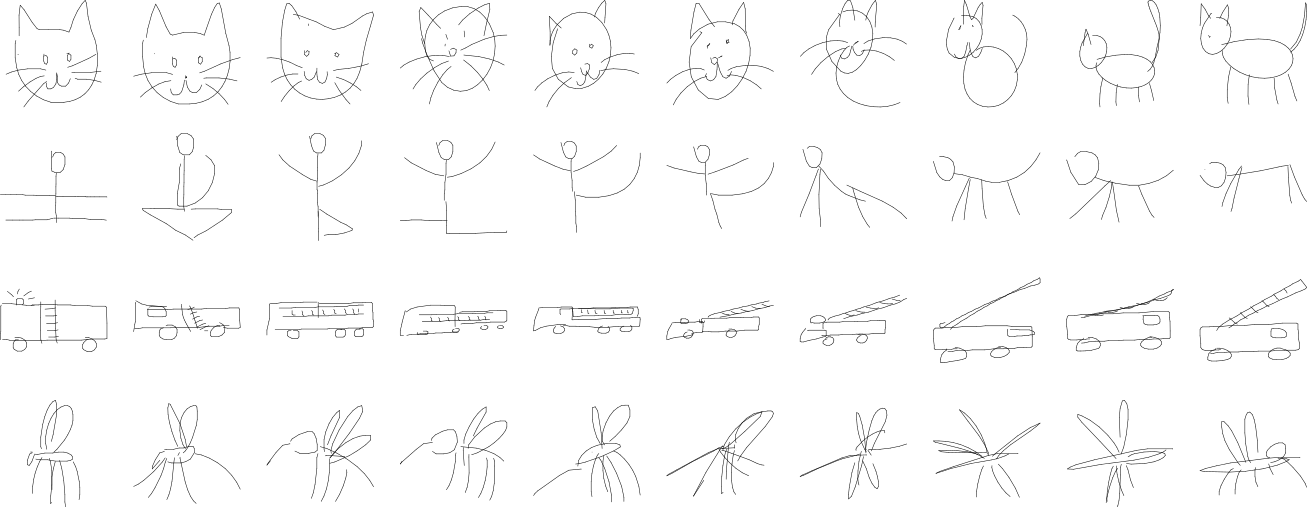\n\n*Examples of vector images produced by this generative model.*\n\n## SketchRNN\n\nThis document is an introduction on how to use the Sketch RNN model in JavaScript to generate images. The SketchRNN model is trained on stroke-based vector drawings. The model implementation here is able to handle unconditional (decoder-only) generation of vector images.\n\nFor more information, please read original the [model](https://magenta.tensorflow.org/sketch_rnn) description and for the Python TensorFlow implementation.\n\n## Getting started\n\nIn the .html files, we need to include `magentasketch.js`. Our example sketch are built with [p5.js](https://p5js.org/) and stored in a file such as `sketch.js`, so we have also included p5 libraries here too. Please see this minimal example:\n\n```html\n\n\n \n \n \n\n\n \n\n\n```\n\n\n### Generating a sketch\n\nBelow is the essence of how a sketch is generated. In addition to the original [paper](https://arxiv.org/abs/1704.03477), a simple tutorial for understanding how RNNs can generate a set of strokes is [here](http://blog.otoro.net/2017/01/01/recurrent-neural-network-artist/).\n\n```js\nlet model;\nlet dx, dy; // offsets of the pen strokes, in pixels\nlet pen_down, pen_up, pen_end; // keep track of whether pen is touching paper\nlet x, y; // absolute coordinates on the screen of where the pen is\nlet prev_pen = [1, 0, 0]; // group all p0, p1, p2 together\nlet rnn_state; // store the hidden states of rnn's neurons\nlet pdf; // store all the parameters of a mixture-density distribution\nlet temperature = 0.45; // controls the amount of uncertainty of the model\nlet line_color;\nlet model_loaded = false;\n\n// loads the TensorFlow.js version of sketch-rnn model, with the \"cat\" model's weights.\nmodel = new ms.SketchRNN(\"https://storage.googleapis.com/quickdraw-models/sketchRNN/models/cat.gen.json\");\n// code that ensures the above line is run before the below lines are run.\n\nfunction setup() {\n x = windowWidth / 2.0;\n y = windowHeight / 3.0;\n createCanvas(windowWidth, windowHeight);\n frameRate(60);\n\n // Initialize the scale factor for the model. Bigger -> large outputs.\n model.setPixelFactor(3.0);\n\n // Initialize pen's states to zero.\n [dx, dy, pen_down, pen_up, pen_end] = model.zeroInput(); // The pen's states.\n\n // Zero out the rnn's initial states.\n rnn_state = model.zeroState();\n\n // Define color of line.\n line_color = color(random(64, 224), random(64, 224), random(64, 224));\n};\n\nfunction draw() {\n // See if we finished drawing.\n if (prev_pen[2] == 1) {\n noLoop(); // Stop drawing.\n return;\n }\n\n // Using the previous pen states, and hidden state, get next hidden state\n // the below line takes the most CPU power, especially for large models.\n rnn_state = model.update([dx, dy, pen_down, pen_up, pen_end], rnn_state);\n\n // Get the parameters of the probability distribution (pdf) from hidden state.\n pdf = model.getPDF(rnn_state, temperature);\n\n // Sample the next pen's states from our probability distribution.\n [dx, dy, pen_down, pen_up, pen_end] = model.sample(pdf);\n\n // Only draw on the paper if the pen is touching the paper.\n if (prev_pen[0] == 1) {\n stroke(line_color);\n strokeWeight(3.0);\n line(x, y, x+dx, y+dy); // Draw line connecting prev point to current point.\n }\n\n // Update the absolute coordinates from the offsets\n x += dx;\n y += dy;\n\n // Update the previous pen's state to the current one we just sampled\n prev_pen = [pen_down, pen_up, pen_end];\n};\n```\n\n## Demos\n\nThere are several demos available in `demos` directory that show how to use the SketchRNN model. You can also view the [hosted demos](https://tensorflow.github.io/magenta-js/sketch/demos), or run the\nexamples locally by running `yarn run-demos`. This command will first build the library `magentasketch.js` from the TypeScript source files, and then launch the server, where you can put in `http://127.0.0.1:8080` into your web browser to select the demos.\n\n### 1) simple.html / simple.js\nThis demo generates a bird using the model using the example code in the earlier section.\n\nSee the [simple](https://tensorflow.github.io/magenta-js/sketch/demos/simple.html) demo.\n\n### 2) predict.html / predict.js\n\nThis demo attempts to finish the drawing given starting set of strokes (a circle, drawn in red).\nIn this demo, you can also select other classes, like \"cat\", \"ant\", \"bus\", etc. The demo will dynamically load the json files in the models directory but cache previously loaded json models.\n\nSee the [predict](https://tensorflow.github.io/magenta-js/sketch/demos/predict.html) demo.\n\n### 3) interactive\\_predict.html / interactive\\_predict.js\n\nSame as the previous demo, but made to be interactive so the user can draw the beginning of a sketch on the canvas. Similar to the first [AI experiment](https://magenta.tensorflow.org/sketch-rnn-demo). Hitting restart will clear the current human-entered drawing and start from scratch.\n\nSee the [interactive predict](https://tensorflow.github.io/magenta-js/sketch/demos/interactive_predict.html) demo.\n\n## Pre-trained models\nWe have provided around 100 pre-trained sketch-rnn models. We have trained the models with a .gen.json extension.\n\nThe models are located in:\n\n`https://storage.googleapis.com/quickdraw-models/sketchRNN/large_models/category.gen.json`\n\nwhere *category* is a quickdraw category such as *cat*, *dog*, *the\\_mona\\_lisa* etc., Some models are trained on more than one category, such as *catpig* or *crabrabbitfacepig*.\n\ni.e.\n\n`https://storage.googleapis.com/quickdraw-models/sketchRNN/large_models/spider.gen.json`\n\nor\n\n`https://storage.googleapis.com/quickdraw-models/sketchRNN/large_models/the_mona_lisa.gen.json`\n\nA set of smaller models (with LSTM node size = 512 only) are located in:\n\n`https://storage.googleapis.com/quickdraw-models/sketchRNN/models/category.gen.json`\n\nHere is a list of all the models provided:\n\n|Models | | | | |\n|---|---|---|---|---|\n|alarm_clock|ambulance|angel|ant|antyoga|\n|backpack|barn|basket|bear|bee|\n|beeflower|bicycle|bird|book|brain|\n|bridge|bulldozer|bus|butterfly|cactus|\n|calendar|castle|cat|catbus|catpig|\n|chair|couch|crab|crabchair|crabrabbitfacepig|\n|cruise_ship|diving_board|dog|dogbunny|dolphin|\n|duck|elephant|elephantpig|eye|face|\n|fan|fire_hydrant|firetruck|flamingo|flower|\n|floweryoga|frog|frogsofa|garden|hand|\n|hedgeberry|hedgehog|helicopter|kangaroo|key|\n|lantern|lighthouse|lion|lionsheep|lobster|\n|map|mermaid|monapassport|monkey|mosquito|\n|octopus|owl|paintbrush|palm_tree|parrot|\n|passport|peas|penguin|pig|pigsheep|\n|pineapple|pool|postcard|power_outlet|rabbit|\n|rabbitturtle|radio|radioface|rain|rhinoceros|\n|rifle|roller_coaster|sandwich|scorpion|sea_turtle|\n|sheep|skull|snail|snowflake|speedboat|\n|spider|squirrel|steak|stove|strawberry|\n|swan|swing_set|the_mona_lisa|tiger|toothbrush|\n|toothpaste|tractor|trombone|truck|whale|\n|windmill|yoga|yogabicycle|everything||\n\n\n## Building the model\n\nThe implementation was written in TypeScript and built with the yarn tool:\n\n`yarn install` to install dependencies.\n\n`yarn build` to compile ts into js\n\n`yarn bundle` to produce a bundled version in `dist/`.\n\n## Train own model\n\nThere is a small IPython [notebook](https://github.com/tensorflow/magenta-demos/blob/master/jupyter-notebooks/Sketch_RNN_TF_To_JS_Tutorial.ipynb) to show how to quickly train a sketch-rnn model with Python-based TensorFlow model, and convert that model over to the JSON format that can be used by by this model.\n\n## Additional Notes\n\n### Scale Factors\n\nWhen training the models, all the offset data has been normalized to have a standard deviation of 1.0 on the training set, after simplifying the strokes. Neural nets work best when training on normalized data. However, the original data recorded with the QuickDraw web app stored everything as pixels, which was scaled down so that on average the stroke offsets are ~ 1.0 length. Thus each dataclass has its own `scale_factors` to scale down, and these numbers are usually between 60 to 120 depending on the dataset. These scale factors are stored into `model.info.scale_factor`. The model will assume all inputs and outputs to be in pixel space, not normalized space, and will do all the scaling for you. You can modify these in the model directly, but it is not recommended. Rather than overwriting the `scale_factor` value, modify the pixel_factor instead, as described in the next paragraph.\n\nIf using PaperJS, it is recommended that you leave everything as it is. When using P5.JS, all the recorded data looks much bigger compared to the original app by a factor of exactly 2, and this is likely due to anti-aliasing functionality of web browsers. Hence the extra scaling factor for the model called `pixel_factor`. If you want to make interactive apps and receive realtime drawing data from the user, and you are using PaperJS, it is best to set do a `model.set_pixel_factor(1.0)`. For p5.js, do a `model.set_pixel_factor(2.0)`. For non-interactive applications, using a larger `set_pixel_factor` will reduce the size of the generated image.\n\n### Line Data vs Stroke Data\n\nData collected by the original quickdraw app are stored in the below format, which is a list of list of [\"x\", \"y\"] pixel points.\n\n```\n[[[\"x\": 123, \"y\": 456], [\"x\": 127, \"y\": 454], [\"x\": 137, \"y\": 450], [\"x\": 147, \"y\": 440], ...], ...]\n```\n\nThe first thing to do is to convert this format into line format, and get rid of the \"x\" and \"y\" orderings. In the Line Data format, x always come before y:\n\n```\nLine Data: [[[123, 456], [127, 454], [137, 450], [147, 440], ...], ...]\n```\n\nThe model contains helper functions to convert between this formats. This Line Data format must be first simplified using `simplify_lines` or `simplify_line` (depending if it is a list of polylines or just a single polyline) first. Afterwards, the simplified line will be fed into lines_to_strokes to convert into the Stroke Data format used by the model.\n\nIn the Stroke Data format, we assume the drawing starts at the origin, and store only the offset points from the previous location. The format is 2 dimensional, rather than 3 dimensional as in the Line Data format:\n\nEach row of the stroke will be 5 elements:\n\n```\n[dx, dy, p0, p1, p2]\n```\n\n`dx, dy` are the offsets in pixels from the previous point.\n\n`p0, p1, p2` are binary values, and only one of them will be 1, the other 2 must be 0.\n\n```text\np0 = 1 means the pen stays on the paper at the next stroke.\np1 = 1 means the pen will is now above the paper after this stroke. The next stroke will be the start of a new line.\np2 = 1 means the drawing has stopped. Stop drawing anything!\n```\n\nThe drawing will be decomposed into a list of `[dx, dy, p0, p1, p2]` strokes.\n\nThe mapping from Line Data to Stroke Data will lose the information about the starting position of the drawing, so you may want to record `LineData[0][0]` to keep this info.\n\n\n[sketch-rnn]: https://github.com/tensorflow/magenta/tree/master/magenta/models/sketch_rnn\n","_attachments":{},"license":"Apache-2.0"}